Daisy Pattern JPEG: A Practical Guide for Textile and Surface Design
When selecting digital patterns for physical applications—whether printing on cotton fabric, vinyl wall murals, gift box wraps, or polyester umbrella canopies—the Daisy Pattern JPEG stands out as a widely used, accessible option. Unlike vector-based or layered PSD files, a Daisy Pattern JPEG is a raster image saved in the JPEG format, typically with high resolution (e.g., 4000 × 4000 px), designed to tile seamlessly across surfaces. Its appeal lies not in technical complexity but in straightforward usability: it loads instantly, opens in virtually any design software or print workflow, and requires no special licensing or editing tools.
What Makes a Daisy Pattern JPEG Distinct?
A Daisy Pattern JPEG isn’t defined by a single source or brand—it’s a functional category. What sets it apart is its combination of visual motif (a classic daisy motif—often stylized, symmetrical, and light-hearted), resolution (commonly 4000 × 4000 px), and format (JPEG). That resolution allows for crisp output at medium to large scales: a 4000 px width translates to ~13.3 inches at 300 DPI, sufficient for most textile repeats, throw pillow covers (18"–24"), or standard wall decals up to 36". The JPEG format ensures compatibility, but also introduces inherent constraints—no transparency, no editable layers, and fixed color profiles (usually sRGB).
Crucially, many Daisy Pattern JPEGs are built for tiling. This means edges align precisely when repeated horizontally and vertically—no visible seams when printed across yardage or wallpaper panels. That tiling behavior isn’t automatic; it’s intentionally engineered during creation. So while any floral JPEG could be called “daisy-themed,” a true Daisy Pattern JPEG is purpose-built for repetition and surface coverage—not just decoration.
How It Compares to Other Pattern Formats
Choosing a Daisy Pattern JPEG often involves tradeoffs against alternatives. Here’s how it stacks up in practice:
- Vector patterns (AI, EPS, SVG): Infinitely scalable and editable—ideal for logos, signage, or custom resizing. But they require vector software (Illustrator, Affinity Designer) and aren’t always optimized for textile grain or dye-sublimation workflows. A Daisy Pattern JPEG skips that learning curve—but won’t scale cleanly beyond ~60 inches without interpolation artifacts.
- TIFF or PNG files: Offer higher fidelity (lossless compression, alpha channels), especially useful for complex shadows or transparent overlays. However, they’re larger in file size and less universally accepted by online print-on-demand platforms. For simple, flat-color daisy repeats where transparency isn’t needed, JPEG delivers comparable visual results with lighter bandwidth and broader platform support.
- Procedural or algorithmic patterns: Generated via tools like Adobe Substance or code-based libraries, these allow real-time variation (color shifts, density control, scale adjustment). They’re powerful for designers iterating rapidly—but overkill if you need one reliable, print-ready asset for bedding or stationery.
- Photographic or hand-drawn scans: Offer organic texture and authenticity, but rarely tile without manual retouching. A well-made Daisy Pattern JPEG saves hours of edge-blending work—though it may feel less “handmade” than a scanned watercolor repeat.
Where a Daisy Pattern JPEG Excels—and Where It Falls Short
The strength of a Daisy Pattern JPEG lies in its reliability for predictable, mid-volume production. Consider these real-world examples:
- A small-batch apparel brand ordering 50–200 yards of cotton poplin for summer dresses uses a 4000 × 4000 px Daisy Pattern JPEG because their digital textile printer accepts JPEG natively, and the resolution exceeds their maximum cut width (54"). No conversion steps. No risk of misaligned vectors.
- An indie stationery maker applying daisy motifs to kraft paper gift boxes chooses JPEG over PNG because their cutting-and-printing service explicitly lists JPEG as the preferred upload format—and rejects files over 25 MB (which TIFFs often exceed).
- A home decorator designing peel-and-stick wallpaper for a nursery uploads a Daisy Pattern JPEG directly into Spoonflower’s interface. It passes automated tiling checks, renders accurately in their preview tool, and prints without color-shift surprises—thanks to consistent sRGB handling.
But limitations exist. If you need to isolate individual daisies for embroidery digitizing, a JPEG won’t help—you’d need a vector or high-contrast PNG with clean edges. If your project demands Pantone-matched spot colors for luxury packaging, JPEG’s RGB-only nature means extra conversion steps and potential hue drift. And if you’re developing a responsive web pattern library (e.g., CSS background-repeat), SVG would scale more gracefully across device sizes than a fixed-resolution JPEG.
Decision Factors: When to Choose—or Skip—a Daisy Pattern JPEG
Ask yourself these practical questions before committing:
- What’s your output medium? For fabric, paper, vinyl, or ceramic sublimation transfers—especially through services like Printful, Gooten, or local print shops—JPEG is often the default, tested, and safest choice. For laser engraving, CNC routing, or AR surface mapping, vector or DXF may be mandatory.
- Do you need transparency or layered effects? If your daisy motif must sit over photos, gradients, or variable backgrounds (e.g., branded tote bags with photo inserts), a PNG with alpha channel gives flexibility JPEG lacks.
- Is color accuracy mission-critical? High-end packaging or gallery wall art may require CMYK TIFFs with embedded ICC profiles. A Daisy Pattern JPEG works well for general use—but verify your printer’s color management policy first.
- How much editing do you anticipate? If you’ll adjust spacing, recolor stems, or add monograms, start with layered PSD or vector files—even if you later export JPEG for final print. Editing a flattened JPEG degrades quality with each save.
Realistic Expectations for 4000 × 4000 px Resolution
“4000 × 4000 px” sounds expansive—but resolution needs depend entirely on viewing distance and substrate. On a close-read item like a linen napkin (18" square), 4000 px yields ~222 PPI—more than adequate. On a 10-foot-wide event backdrop viewed from 6+ feet away, even 150 PPI suffices. Don’t assume bigger is always better: unnecessarily large files slow down uploads, increase cloud storage costs, and offer no perceptible benefit if your printer caps input at 300 DPI.
Also note: pixel dimensions alone don’t guarantee quality. A poorly anti-aliased, over-sharpened, or low-bit-depth Daisy Pattern JPEG may look jagged or posterized when enlarged—even at 4000 px. Always inspect the image at 100% zoom before purchase or download. Look for smooth petal edges, consistent tone transitions, and absence of compression artifacts near high-contrast areas (e.g., white petals against green stems).
Happy Printing—With Intention
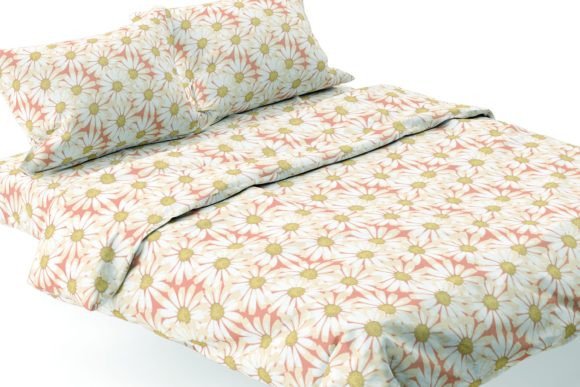
“Happy printing” isn’t just a tagline—it reflects a mindset: choosing tools that match your workflow, audience, and outcome. A Daisy Pattern JPEG supports that when simplicity, speed, and broad compatibility matter most. It’s not the most flexible format, nor the most precise—but for textile repeats, wall decor, umbrellas, bedding, and pillows, it remains one of the most consistently dependable options available.
That said, informed decisions come from understanding context—not defaults. If your project leans toward customization, archival standards, or multi-platform reuse, explore vector or layered alternatives early. But if you need an attractive, tiling-ready daisy motif—tested across printers, proven in production, and ready to drop into Canva, Photoshop, or your shop’s CMS—a well-sourced Daisy Pattern JPEG is a pragmatic, time-saving foundation. Just ensure it’s truly seamless, appropriately sized, and aligned with your printer’s technical specs. Then, yes—happy printing.